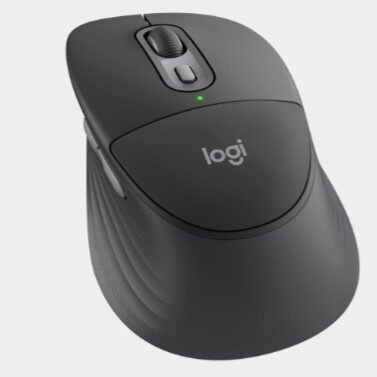
Logitech Signature Comfort Plus M850 L లాంచ్
కొత్త Logitech Signature Comfort Plus M850 L wireless mouse ను long working hours కోసం comfort, productivityపై focus చేస్తూ తీసుకొచ్చింది. ఈ mouseలో సాధారణ ergonomic shapeతో పాటు ప్రత్యేకంగా palm cushionను అందించడం ప్రధాన ఆకర్షణగా చెప్పవచ్చు.
ముఖ్యంగా deskపై ఎక్కువ సమయం laptop లేదా desktopతో పని చేసే usersను దృష్టిలో పెట్టుకుని ఈ mouseను రూపొందించారు.
Sculpted right-hand design, thumb rest, rubber side grip, quiet clicks, SmartWheel scrolling వంటి features ఇందులో ఉన్నాయి.
అదేవిధంగా Bluetooth connectivityతో పాటు Logi Bolt USB-C receiver ద్వారా కూడా connect చేసుకునే అవకాశం ఉంది.
Easy-Switch featureతో మూడు devices వరకు connect చేసి వాటి మధ్య switch చేసుకోవచ్చు.
Palm Cushionతో కంఫర్ట్పై ప్రత్యేక ఫోకస్
Signature Comfort Plus M850 L లో లాజిటెక్ ప్రత్యేకంగా palm cushionను అందించింది. కంపెనీ ప్రకారం, ఇది Logitech mouseలో palm cushionను ఉపయోగించిన మొదటి design.
చేతి అరచేతికి support లభించేలా mouse పైభాగంలో soft cushionను ఏర్పాటు చేశారు.
ఈ design ముఖ్యంగా ఎక్కువసేపు mouse ఉపయోగించే సమయంలో చేతిపై ఉండే pressureను తగ్గించడానికి ఉద్దేశించబడింది.
అయితే actual comfort అనేది user చేతి పరిమాణం, grip style, ఉపయోగించే విధానం వంటి అంశాలపై ఆధారపడి మారవచ్చు.
Logitech నిర్వహించిన 2025 US studyలో 105 మంది external participantsను ఉపయోగించి చేసిన 5-day usage trialలో 93 శాతం మంది పూర్తి working day తర్వాత కూడా mouse comfortableగా ఉందని పేర్కొన్నారు. ఇది Logitech నిర్వహించిన study ఫలితం మాత్రమే అని గమనించాలి.
Sculpted Shape, Thumb Rest
Mouse shapeను right-hand usersకు అనుగుణంగా sculpted designతో రూపొందించారు. సాధారణ flat mouseలతో పోలిస్తే చేతి సహజ ఆకృతికి దగ్గరగా ఉండేలా body shapeను ఇచ్చారు.
ఇందులో thumb restతో పాటు extended rubber side grip కూడా ఉంది. దీంతో mouseను పట్టుకునే సమయంలో thumbకు ప్రత్యేక support లభిస్తుంది. Rubber grip వల్ల చేతి పట్టును స్థిరంగా ఉంచేందుకు సహాయం చేస్తుంది.
అయితే ఇది right-handed users కోసం రూపొందించిన mouse. Left-handed users కోసం ప్రత్యేక left-hand version ఇందులో లేదు.
SmartWheel Scrolling
Scrolling కోసం SmartWheel technologyను ఉపయోగించారు. ఇది ఈ mouseలోని ముఖ్యమైన productivity featuresలో ఒకటి.
SmartWheel ద్వారా అవసరాన్ని బట్టి రెండు రకాల scrolling experienceను ఉపయోగించుకోవచ్చు. Documents లేదా webpagesలో ఒక్కో lineను కచ్చితంగా scroll చేయాల్సినప్పుడు precision scrolling ఉపయోగపడుతుంది.
అదే సమయంలో పెద్ద webpages, long documents లేదా listsలో వేగంగా ముందుకు వెళ్లాల్సినప్పుడు fast scrolling ఉపయోగించుకోవచ్చు. ఈ విధంగా scrolling speedను పని అవసరానికి అనుగుణంగా మార్చుకునే అవకాశం ఉంటుంది.
Quiet Clicks కోసం Silent Touch Technology
రోజువారీ office లేదా work-from-home usageలో mouse clicks నుంచి వచ్చే శబ్దం కూడా ఇబ్బందిగా మారవచ్చు. దీన్ని దృష్టిలో పెట్టుకుని Logitech Silent Touch technologyను అందించింది.
కంపెనీ specification ప్రకారం, ఈ technology click noiseను సుమారు 90 శాతం వరకు తగ్గిస్తుంది. అందువల్ల shared workspace, office desk లేదా ప్రశాంతమైన environmentలో mouse ఉపయోగించేటప్పుడు clicks వల్ల వచ్చే distractionను తగ్గించుకోవచ్చు.
ఇది mouse యొక్క basic functionalityను మార్చకుండా click soundను తగ్గించే featureగా పనిచేస్తుంది.
మొత్తం 6 Buttons
లాజిటెక్ సిగ్నేచర్ కంఫర్ట్ ప్లస్ M850 L లో మొత్తం 6 buttons ఉన్నాయి.
వాటిలో:
- Left click
- Right click
- Middle click / scroll wheel
- Back
- Forward
- DPI button
ఉన్నాయి.
Back, Forward buttons వల్ల browserలో webpages మధ్య ముందుకు, వెనక్కి వెళ్లడం సులభంగా ఉంటుంది. అలాగే DPI button ద్వారా pointer sensitivityని మార్చుకోవచ్చు.
Buttonsను Customize చేసుకునే అవకాశం
ఈ mouseలోని supported buttonsను software ద్వారా customize చేసుకునే అవకాశం ఉంది. Logi Options+ applicationను ఉపయోగించి అవసరానికి అనుగుణంగా shortcuts లేదా ఇతర supported actionsను buttonsకు assign చేయవచ్చు.
ఉదాహరణకు తరచుగా ఉపయోగించే shortcutను ఒక buttonకు assign చేయడం ద్వారా repeated keyboard actionsను తగ్గించుకోవచ్చు.
ముఖ్యంగా రోజువారీ productivity పనుల్లో ఒకే రకమైన commandsను తరచుగా ఉపయోగించే usersకు button customization ఉపయోగపడే అవకాశం ఉంది. Logitech ప్రకారం, ఈ mouseలో నాలుగు buttons వరకు programmable functionsకు ఉపయోగించుకోవచ్చు.
Actions Ring Feature
Logi Options+ software ద్వారా Actions Ring featureను కూడా ఉపయోగించుకోవచ్చు. దీనిలో frequently used tools మరియు shortcutsను ఒకే చోట access చేసుకునే అవకాశం ఉంటుంది.
ఈ feature ద్వారా mouse నుంచి shortcutsను త్వరగా access చేయడం సాధ్యమవుతుంది. అందువల్ల keyboard shortcutsను పదేపదే ఉపయోగించాల్సిన అవసరం కొన్ని పనుల్లో తగ్గవచ్చు.
అయితే Actions Ring మరియు advanced customization features కోసం supported Logitech software అవసరం ఉంటుంది.
Sensor, DPI వివరాలు
Tracking కోసం Advanced Optical Tracking sensorను ఉపయోగించారు. Mouse nominal tracking value 1,000 DPIగా ఉంది.
అయితే user అవసరానికి అనుగుణంగా DPIని 400 నుంచి 4,000 DPI మధ్య మార్చుకోవచ్చు. DPI adjustmentను 50 DPI incrementsలో చేయవచ్చు.
DPI తక్కువగా ఉంచితే cursor movement మరింత controlledగా ఉంటుంది. High DPI settingలో తక్కువ physical movementతో screenపై cursor ఎక్కువ దూరం కదులుతుంది. అందువల్ల browsing, office work, large displays వంటి usage scenariosకు తగిన settingను ఎంచుకోవచ్చు.
Bluetooth మరియు Logi Bolt Connectivity
Connectivity విషయంలో Logitech రెండు wireless optionsను అందించింది.
మొదటిది Bluetooth Low Energy (BLE) connectivity. దీనివల్ల compatible laptop లేదా desktopకు Bluetooth ద్వారా mouseను connect చేసుకోవచ్చు. ప్రత్యేక dongle అవసరం లేకుండా Bluetooth connectionను ఉపయోగించవచ్చు.
రెండవది Logi Bolt USB-C receiver. ఇది boxలోనే అందించబడుతుంది. Computerలో compatible USB-C port ఉంటే receiver ద్వారా mouseను connect చేయవచ్చు.
Wireless range గరిష్ఠంగా 10 మీటర్ల వరకు ఉంటుందని Logitech పేర్కొంది. అయితే actual range అనేది environment, obstacles, computer setup వంటి అంశాలపై ఆధారపడి మారవచ్చు.
Easy-Switchతో మూడు Devices వరకు
Easy-Switch feature వల్ల ఈ mouseను గరిష్ఠంగా మూడు devicesతో connect చేసి వాటి మధ్య switch చేసుకోవచ్చు.
ఉదాహరణకు ఒక user laptopలో పని చేస్తూ, మరో desktop లేదా compatible deviceతో కూడా mouseను ఉపయోగించాలనుకుంటే ప్రతి సారి pairing process చేయాల్సిన అవసరం ఉండదు. Easy-Switch ద్వారా paired devices మధ్య మారే అవకాశం ఉంటుంది.
Multi-device setup ఉపయోగించే usersకు ఈ feature ముఖ్యంగా ఉపయోగపడుతుంది. Logitech కూడా M850 Lను multitasking మరియు multiple-device workflows కోసం ఈ featureతో అందిస్తోంది.
Battery Life
Battery విషయంలో ఒక AA batteryని ఉపయోగిస్తారు. Boxలోనే ఒక AA battery అందించబడుతుంది.
Logitech ప్రకారం, battery life 24 నెలల వరకు ఉంటుంది. అంటే usage conditions అనుకూలంగా ఉంటే తరచుగా battery మార్చాల్సిన అవసరం ఉండదు.
అయితే ఇది rechargeable mouse కాదు. కాబట్టి battery పూర్తయినప్పుడు AA batteryని మార్చాల్సి ఉంటుంది. Logitech కూడా actual battery life user usage మరియు computing conditions ఆధారంగా మారవచ్చని స్పష్టం చేసింది.
Design, Dimensions, Weight
Signature Comfort Plus M850 L ergonomic designతో వచ్చినప్పటికీ, ఇది చాలా చిన్న compact mouse కాదు. Right-hand users కోసం sculpted shapeను ఉపయోగించారు.
Mouse dimensions:
- ఎత్తు: 121.3 mm
- వెడల్పు: 74.3 mm
- లోతు: 44.2 mm
- బరువు: 102.9 గ్రాములు, batteryతో కలిపి
ఈ dimensions మరియు weightను Logitech official specificationsలో పేర్కొంది.
Palm cushion, thumb rest, rubber side grip వంటి elements వల్ల mouse designలో comfortకు ఎక్కువ ప్రాధాన్యత ఇచ్చినట్లు తెలుస్తుంది.
Software Support
Mouse customization కోసం Logi Options+ softwareను ఉపయోగించవచ్చు. దీనితో supported buttonsను customize చేయడం, scrolling behaviourను మార్చడం, pointer speedను adjust చేయడం వంటి options అందుబాటులో ఉంటాయి.
Business users కోసం Logitech Logi Tune మరియు Logitech Sync supportను కూడా అందిస్తోంది. Logitech documentation ప్రకారం, software ద్వారా button customization, scrolling/pointer speed adjustment, battery status check మరియు firmware updates వంటి పనులు చేయవచ్చు.
అందువల్ల basic mouse functionality కోసం software తప్పనిసరి కాకపోయినా, advanced customization కోసం Logitech software ఉపయోగపడుతుంది.
Windows, macOS, ChromeOS, Linux Support
Compatibility విషయంలో ఈ mouse పలు operating systemsకు support ఇస్తుంది.
Bluetooth ద్వారా:
- Windows 10, 11 లేదా తర్వాతి versions
- macOS 12 లేదా తర్వాతి versions
- ChromeOS
- Linux
- Android 12 లేదా తర్వాతి versions
- iPadOS 15 లేదా తర్వాతి versions
తో compatibility ఉంది.
Logi Bolt receiver ద్వారా Windows, macOS, ChromeOS మరియు Linux systemsలో ఉపయోగించవచ్చు. కొన్ని operating systemsలో basic functions software లేకుండానే పనిచేస్తాయి. అయితే advanced customization కోసం compatible Logitech software అవసరం కావచ్చు.
Productivity పనులకు ఉపయోగపడే Features
సిగ్నేచర్ కంఫర్ట్ ప్లస్ M850 L లో comfortతో పాటు productivityపై కూడా Logitech దృష్టి పెట్టింది.
Palm cushion, sculpted design, thumb rest వంటి hardware features చేతికి supportను అందించడానికి ఉద్దేశించబడ్డాయి. మరోవైపు SmartWheel, customizable buttons, Actions Ring మరియు Easy-Switch వంటి features రోజువారీ computer tasksను వేగంగా నిర్వహించేందుకు ఉపయోగపడతాయి.
అందువల్ల ఈ mouseను కేవలం browsing కోసం మాత్రమే కాకుండా office work, documents, spreadsheets, web research మరియు multiple-device workflows వంటి పనులకు కూడా ఉపయోగించుకునేలా రూపొందించారు.
Recycled Plasticతో తయారీ
Sustainability విషయంలో కూడా Logitech ఈ mouseలో recycled materialsను ఉపయోగించింది.
కంపెనీ ప్రకారం, Signature Comfort M850 L లోని plastic partsలో కనీసం 63 శాతం certified post-consumer recycled plasticను ఉపయోగించారు. అయితే printed wiring assembly, receiver, cables మరియు packaging వంటి భాగాలు ఈ లెక్కలోకి రావు.
ఇది పాత consumer electronicsలోని plasticకు మరోసారి ఉపయోగం కల్పించడం ద్వారా environmental footprintను తగ్గించాలనే Logitech ప్రయత్నంలో భాగంగా ఉంది.
Boxలో ఏముంటాయి?
Signature Comfort Plus M850 L packageలో ప్రధానంగా:
- Logitech Signature Comfort Plus M850 L mouse
- 1× AA battery
- Logi Bolt USB-C receiver
- User documentation
అందిస్తారు.
అందువల్ల receiverను విడిగా కొనుగోలు చేయాల్సిన అవసరం ఉండదు.
Logitech Signature Comfort Plus M850 L ధర
లాజిటెక్ సిగ్నేచర్ కంఫర్ట్ ప్లస్ M850 L ను Logitech అధికారిక US storeలో $49.99 ధరకు లిస్ట్ చేసింది.
Logitech ప్రకారం Signature Comfort Plus lineup global availability June 2026 నుంచి ప్రారంభమైంది. భారత మార్కెట్లో actual retail price, stock మరియు availability sellerను బట్టి మారవచ్చు.
కాబట్టి Indiaలో కొనుగోలు చేసే సమయంలో Logitech official store లేదా authorized seller వద్ద ప్రస్తుత ధరను పరిశీలించడం మంచిది.
లాజిటెక్ సిగ్నేచర్ కంఫర్ట్ ప్లస్ M850 L ఎవరికి ఉపయోగపడుతుంది?
ఈ mouseలో ప్రధానంగా comfort మరియు productivity featuresపై focus ఉంది. అందువల్ల రోజూ ఎక్కువసేపు computer ముందు పని చేసే office users, work-from-home users మరియు multiple devices ఉపయోగించే వారికి దీని features ఉపయోగపడే అవకాశం ఉంది.
ముఖ్యంగా palm cushion, quiet clicks, SmartWheel, customizable buttons మరియు Easy-Switch వంటి features అవసరమైన usersకు ఇది సాధారణ wireless mouseల కంటే ఎక్కువ functionality అందిస్తుంది.
అయితే left-handed usersకు ఇది సరైన option కాకపోవచ్చు, ఎందుకంటే mouse design right-hand users కోసం రూపొందించబడింది. అలాగే rechargeable batteryకి బదులుగా replaceable AA batteryని ఉపయోగించాల్సి ఉంటుంది.
Logitech Signature Comfort Plus M850 Lపై చివరి మాట
లాజిటెక్ సిగ్నేచర్ కంఫర్ట్ ప్లస్ M850 L లో comfort మరియు productivity రెండింటినీ కలిపేలా పలు featuresను అందించారు. ఇందులో ప్రత్యేకమైన palm cushion, sculpted right-hand design, thumb rest, rubber side grip వంటి comfort-focused features ఉన్నాయి.
అదేవిధంగా SmartWheel scrolling, Silent Touch clicks, six buttons, customizable controls, Actions Ring, 400–4000 DPI adjustment, Bluetooth, Logi Bolt receiver మరియు Easy-Switch వంటి features కూడా ఉన్నాయి.
Battery విషయంలో ఒక AA batteryతో 24 నెలల వరకు battery lifeను అందిస్తామని Logitech చెబుతోంది. మూడు devices వరకు Easy-Switch support, multi-OS compatibility వంటి features కూడా ఈ mouseను productivity-focused wireless mouseగా నిలబెడుతున్నాయి.
మొత్తంగా చూస్తే, long working hours కోసం ergonomic design, palm support, quiet operation మరియు multi-device connectivity కోరుకునే usersను లక్ష్యంగా చేసుకుని Logitech Signature Comfort Plus M850 L ను రూపొందించినట్లు చెప్పవచ్చు.
అయితే actual buying decisionలో ధర, right-hand design మరియు replaceable AA battery వంటి అంశాలను కూడా పరిగణనలోకి తీసుకోవడం మంచిది.